Using Artificial Intelligence Intelligently
Welcome to the digital era, where new technology is introduced every day. The latest craze is Artificial Intelligence (AI), but did you know it has been around for a long time? Moreover, students like you can use AI as an educational tool! Grammarly, Speech-To-Text, and programs like ChatGPT can all offer significant educational benefits when students know how to utilize them effectively. Additionally, Virtual Reality (VR) powered by AI can enrich every educational experience.
The History of AI
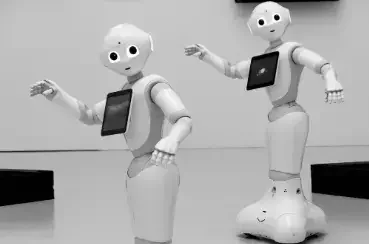
Robots are one of the origional forms of AI.
Artificial Intelligence is not new, nor is it rare. Robots are one of the most obvious and first forms of AI that humans have dabbled with. We are still trying to get the perfect robots and continue to be fascinated with them. Another type of AI is when you play a game against a computer. This technology has been around for some time, but it is getting better and better. NPC players automatically respond based on what the human player does in games like Chess, Fortnite, Minecraft, Roblox, and many others. Then there is Siri, Alexa, Hey Google, and all those. Just by activating them with your voice, they can assist you in acquiring knowledge and completing tasks. Even Teslas (and a few other cars) that can drive by themselves are AI! They respond to road conditions, traffic, and other external factors by using their artificially programmed intelligence. Do you have a Ring doorbell? You can zoom, listen, and talk to people through your camera. Yup. That’s AI too! AI is appearing everywhere in our world and becoming more and more integrated into everyday life.
AI Tools for Students
Grammarly: Improve Writing Skills
A great AI tool for a student to use is Grammarly. However, there are smart ways to use this AI. Though you might be tempted to click through all the lines and auto-fix them when correcting your writing, it really is not the best way to use this tool. Grammarly can be used to teach many grammar rules you never knew. If you hover over the line, Grammarly will tell you what is wrong. If you have misspelled a word and really want to improve and learn to spell, look at the suggestion Grammarly is giving you and type it out instead of clicking to correct it.
Additionally, read the grammar tips and learn what things like “unclear antecedents,” “Oxford commas,” and “tautology” are. I learned all of these through Grammarly! Are you perfect with your punctuation? This is another place where, if you pay attention while using it, Grammarly can teach you and help you become much better with the use of commas, dashes, and semicolons—the more elusive types of punctuation!
Grammarly can also check for plagiarism. If your schoolwork requires you to write numerous essays, especially those with a research-based nature, it is a very good idea to use Grammarly’s plagiarism detector to ensure your essay adheres to plagiarism guidelines. It can check your paper against thousands of internet articles and libraries in seconds and give you a percentage amount that your paper could be copying other work. It will also show you where the information that seems to be copied comes from, with a clickable link. Every good English teacher uses a plagiarism checker, so it is best practice to check for yourself and correct whenever needed before passing in your work.
Although it is powerful and offers great suggestions, Grammarly is not always correct. Every user should carefully review the suggestions given and decide if they are right for the situation. There are a lot of things to consider, and some suggestions can be rejected rather than just clicked on to be accepted. Use Grammarly intelligently!
Speech-to-Text: Beyond Dictation
Speech-to-text is another great AI tool that students can use to complete work and tasks. Everyone knows you can dictate to it, and it will write down what you say. You do always have to go back and correct any mistakes because it does not take tone or accents into consideration. Using speech-to-text to write essays and emails takes some of the burden off slower typers and can get ideas down quickly. Google Docs is great to use for speech-to-text because it has this feature built in and is easy to use.
But don’t stop there! Have you ever considered using it for note-taking? It can be very hard to keep up with taking notes in a live session or even just slowly reading an article and taking notes when you are typing or handwriting the notes. Try using speech-to-text! Open up a whole new set of possibilities to take notes during lectures, class discussions, or study sessions. Google Keep and Microsoft OneNote are just two apps that can help you with this AI to take notes.
Furthermore, speech-to-text is a great tool for those with disabilities who would like to continue learning. They can use this alternative to handwriting or typing to complete assignments or participate in class in ways they might otherwise not be able to. Finally, it can be used to help with language learning. Written language is often the hardest part of a language to learn. A way to help speed up this process is to dictate in the language to speech-to-text and watch how it transcribes what you said. This can also help with accuracy in the spoken language. Speech-to-text is another great example of AI that can be used for more than just its basic use.
ChatGPT: Homework Help and More
ChatGPT and other tools of its type, although quite controversial, can be very useful for students these days. It can be abused, so it is important to learn ways it can be properly utilized to assist with academic tasks. While it should not be relied on to do research for you, ChatGPT can help get you started and give you ideas to look for on any given topic.
Avoid repetition in your writing by asking ChatGPT for synonyms for any given word or phrase. You can brainstorm with ChatGPT by asking questions and reading the responses. I have asked ChatGPT some questions while writing this article! Best practice is to read the response given and work on your own answer or write from it—do not copy and paste. That could still be considered plagiarism.
If you are debating between two ideas, you could write them both into ChatGPT and ask which one is better and why. Part of the debate club? Practice your argument with ChatGPT! It can help create outlines for essays to assist in getting you started with ideas, and then proofread your final essay. It can even check if an essay, article, or other written piece of work is generated by ChatGPT or other AI (go ahead—you can check this article to see how it works!).
Math problems can get trickier and trickier as you progress through levels. ChatGPT can show you how to solve a problem step-by-step to help you understand the process better. You can practice text conversations in a language you are learning, too! Move beyond the controversy and use this tool effectively.
Virtual Reality: Redefined Classrooms
Lastly, there is Virtual Reality for education. Did you know you can do much more with that VR headset than play games? It’s true! Perhaps you are already participating in distance learning over the internet. Zoom is great and all, but with VR powered by AI, new immersive educational experiences can happen.

More than just a game.
Now you can interact in a virtual classroom with whiteboards, teachers, and peers! This creates an enjoyable exposure to AI and advancement to current digital learning settings. Beyond that, VR Field trips visiting a host of places are possible for distance learners when regular in-person field trips are not a possibility.
Scientific simulations for chemistry, surgery, and other immersive simulations can be done much more safely in a VR setting while being more memorable. Imagine dissecting a virtual frog in a VR science lab rather than smelling formaldehyde and cutting into poor, innocent frogs or mixing chemicals to see their reaction without the risk of bodily harm that real-life experiments can cause.
And let’s not forget about gamified learning: teachers present the material as a game to keep students motivated and engaged. The most reluctant learner will be eager to put on their headset and delve into their VR class.
Sometimes, education is hard to obtain for students who have varied abilities. VR can break through these obstacles by offering audio descriptions to the visually impaired or participation in physical activities that those with a physical impairment may not otherwise be able to attend. VR can transform the most boring class into an adventure, making learning both fun and effective. The benefits of all of these things are numerous. Be on the lookout for plenty of AI-powered VR education coming in the near future!
Conclusion
Artificial Intelligence has grown exponentially in the last couple of years. Students can be smart with their use of AI for academic tasks if they learn how to use things like Grammarly, Speech-to-Text, and ChatGPT as proper tools to enhance their education. Will you be one of the students on the cutting edge of AI in your educational journey?
–Misses Dee
About the Author: My name is Delila Wuori, and I've been working in the educational field for over 25 years. It's truly my passion. I love to write and teach a lot of writing classes for all ages. I can show you how to write an article like this! You can visit my Stone Bridges Academy. Although my time is a little limited because I have 5 children, one of whom is a toddler, if you don't find anything you need, I'd be happy to try to work something out. Please leave a comment below or send an email. I love hearing from my readers and students!